.svg)

Payroll Register: What It Is, What It Includes, and How to Use It

Key Takeaways
- A payroll register is the master record of a single pay run, listing each employee's hours, pay rates, gross wages, withholdings, deductions, and net pay, plus the employer taxes owed on top.
- It is the source document for the payroll journal entry, the quarterly and annual tax filings, and most of the payroll records an auditor or Department of Labor investigator will ask to see.
- A pay stub shows one employee their own pay, while the payroll journal translates the register's totals into debits and credits for the general ledger
- Federal rules require keeping payroll records for at least three years under the FLSA and four years for IRS employment tax purposes, and some states require longer.
What a Payroll Register Is and Why Employers Keep One
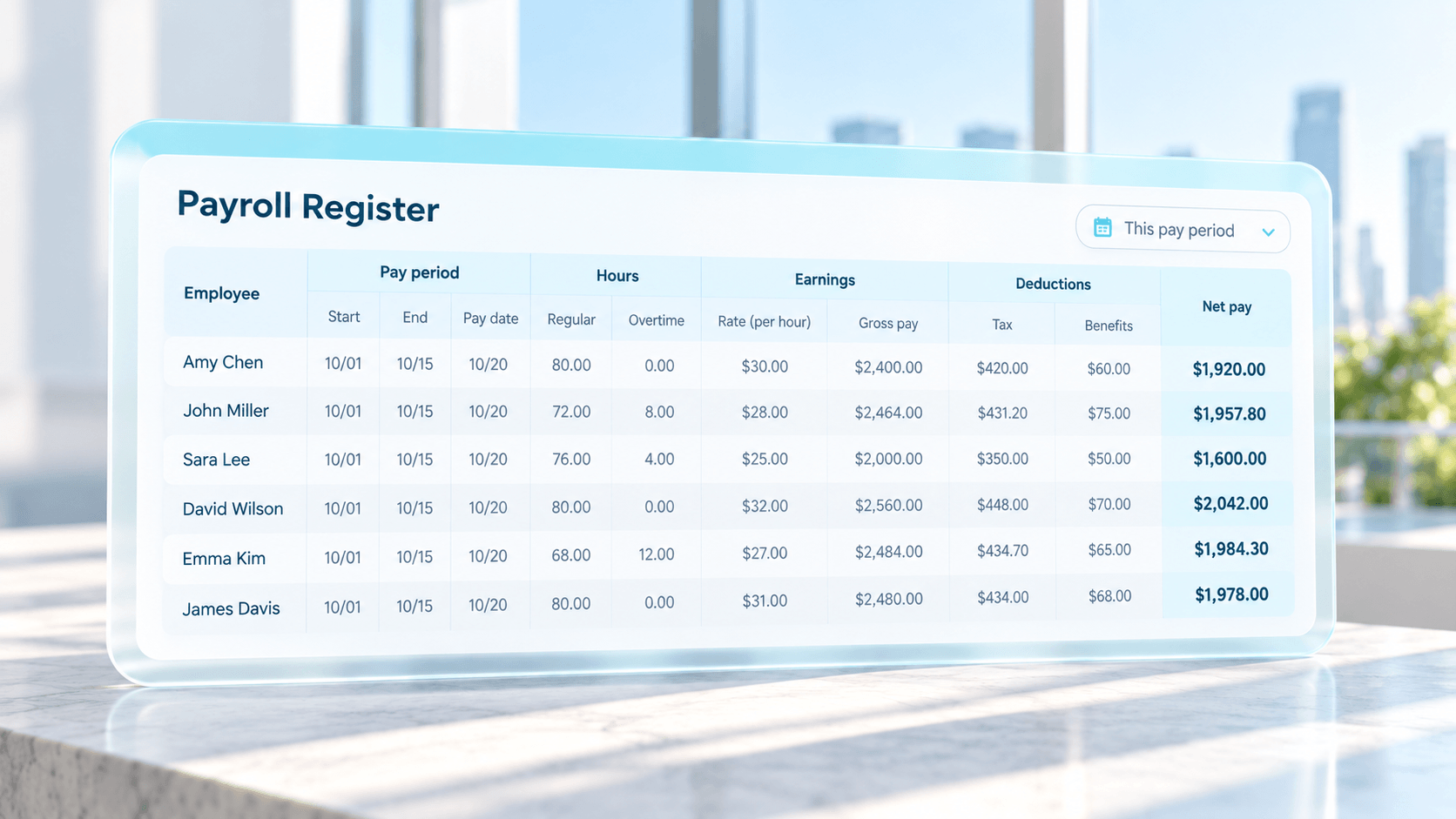
Your payroll system spits out a payroll register on every run, and on plenty of teams nobody opens it unless something has already gone wrong. Each employee paid that period gets a line showing how their check was built, starting from hours and rate and working down through gross wages, taxes and deductions to the net amount deposited. Add the employer taxes printed at the bottom and you're looking at what that payroll really cost.
The easiest way to picture the register is as the receipt for a pay run. Months from now, when someone in accounting can't figure out why a March check came to $1,842.16, the pay stub won't settle it, but that run's register will show which hours, which rate, and which deduction got you there.
In the payroll cycle, the register sits right between calculation and payment. Hours get approved in timekeeping, the payroll system runs the calculation, and a preliminary register comes out for someone to review. Once that person signs off, the money goes out and the final register gets saved as the permanent record. That preliminary version matters more than most people realize, because it's the last moment you can fix a mistake while the money is still sitting in your account.
You'd want one even if nobody required it, but the FLSA does require detailed hour and wage records for nonexempt staff, and the register already has nearly all of them. Accounting books payroll expense off its totals too. If a year's worth of registers is missing when an auditor shows up, somebody gets to rebuild them by hand from pay stubs and bank statements, which is about as fun as it sounds.
Fields and Data Included in a Payroll Register
Every provider lays out the report a bit differently. Strip the formatting away, and the content is close to identical from one vendor to the next.
Employee and period details
Each line opens with who the person is and where they work, along with whether they're paid by the hour and whether the FLSA treats them as exempt. The pay dates and a check or deposit number are usually printed next to that.
Hours and pay rates
Hourly employees generate most of the detail. You'll see regular hours, overtime, and premium time such as holiday pay or a night differential, with the rate used for each one sitting right beside it. PTO and sick hours usually show up here as well. Salaried employees just get their period salary amount.
Gross earnings
Gross pay is everything earned before a single dollar comes out. Good registers break it down by type, so you can see regular wages apart from overtime, bonuses, commissions and tips. Expense reimbursements often get their own line, since they generally aren't taxable wages.
Employee tax withholdings
This block covers federal income tax plus the employee's half of FICA. For 2026 that's 6.2 percent Social Security (up to the wage base) and 1.45 percent Medicare, and anyone past $200,000 in wages picks up another 0.9 percent of Medicare on top. Then come whatever state and local taxes apply where they live or work.
Deductions
You'll usually see deductions sorted by whether they come out before or after tax. A 401(k) deferral or a health premium normally comes out pre-tax, while garnishments and union dues come out after. Why does the split matter? Pre-tax deductions lower taxable wages, so when one is set up wrong, the tax withholding on that check is wrong too.
Net pay
Net pay is what the employee actually takes home once everything above has been subtracted, along with how it was paid.
Employer taxes and contributions
A full register also shows what you pay on top of wages, which the employee never sees. Your half of FICA goes here, along with FUTA and SUTA (federal and state unemployment) and any 401(k) match or employer share of premiums. Because none of this is on a pay stub, the register is the only payroll report that shows what your labor actually costs.
A payroll summary report collapses the same numbers into company totals, sometimes cut by location. Finance tends to do journal entries and month-end close from that one, and goes digging in the full register only when a number doesn't look right.
Payroll Register vs Pay Stub vs Payroll Journal
All three of these describe the same payroll, and what changes from one to the next is who's reading.
A pay stub is written for the employee. It shows that one person's earnings, taxes, deductions and net pay for the period, usually with year-to-date figures, and most states require you to hand one out every payday. Since it leaves out employer taxes and everyone else's pay, a stub can't tell you anything about what the payroll cost the company.
The payroll register, by contrast, belongs to the employer, and you can picture it as a stack of every stub in the run with the employer's costs and grand totals added underneath. Payroll and HR use it to review a run before approving it, to answer employee questions, and to hand to auditors.
A payroll journal entry is written for the general ledger. It takes the register's totals and records them as debits and credits so payroll lands correctly in your financial statements. Individual names drop out at this point, and you're left with wage expense, taxes owed and cash out the door.
Here's how that looks with real numbers, using a 25-person company whose biweekly payroll comes to $85,000 before anything is taken out. On its register, 6,502.50wenttoemployeeFICA(5,270 of that is Social Security) and $9,350 to federal withholding. State tax took $3,400, the 401(k) got $2,550 and health premiums $1,700, so $61,497.50 actually lands in people's accounts.
The company owes its own matching FICA plus $640 of unemployment tax. Booked to the ledger, it comes out like this:
When the company later deposits the taxes and pays the 401(k) provider and insurer, each of those liability balances drops back to zero. If you can't trace a line in that entry to a total on the register, reconciliation has nothing to stand on.
How to Use a Payroll Register for Reconciliation and Reporting
To reconcile payroll, you're really asking whether your register, your bank activity, your general ledger, and your tax filings tell the same story. When they don't line up, the size and location of the gap usually point to the cause.
Begin with the preliminary register, before anyone approves it. We'd pull up last period's version beside it and hunt for anything that changed when you can't say why. Maybe overtime at one site jumped, or someone's gross doubled, or the person who quit two weeks ago is still on there getting paid. Headcount should match what HR thinks it is, and hours should match what managers approved. If you find a problem at this stage, you just rerun payroll; find it after payday, and you're cutting a correction and possibly amending a return.
Once payroll is funded, compare the register's net pay total with what actually left the bank, manual checks included. A mismatch there almost always traces to a check somebody voided or reissued, or to a payment that went out off-cycle.
Next comes the journal entry, which should tie back to the register line for line. Wage expense should equal total gross pay, each tax liability should match its withholding and employer tax totals, and every deduction account should match its column. By month end, each payroll liability account should hold only what's been withheld and not yet paid over. A FICA payable balance that's been sitting there for three pay periods means one of two things: a deposit was missed, or it got posted to the wrong account.
Tax reporting uses the same logic over a longer stretch. Wages and withholding on each quarterly Form 941 should equal the sum of that quarter's registers, and your W-2 totals for the year should equal the sum of every register you ran that year. State unemployment and withholding returns work the same way. Our guide to payroll tax management goes into where those filings most often break down for employers paying in more than one state.
There's a timing problem baked into all of this, though. By the time you reconcile, payroll has already been paid, and the checks mostly look at totals. Six people at one location getting the wrong overtime rate won't move a company total much, and neither will a deduction that silently stopped after open enrollment. That gap is exactly where Celery sits. Celery is an AI-powered payroll protection platform that looks at every line of every run, compares it to your pay rules and to what that employee got last period, and flags what's off so errors get caught before money moves.
{{learn_more}}
Record Retention Rules for Payroll Registers
How long do you have to keep these? Two federal agencies answer that question differently, and the longer answer is the one to plan around.
The Labor Department's rule at 29 CFR 516.5 says three years for payroll records, and your register counts as one. Time cards and wage rate tables get only two years under 516.6. The IRS goes further and asks for four years on anything employment-tax related, counted from when the tax was due or paid, whichever came later.
State law can stretch that out; New York, under Labor Law Section 195, wants six years. Since one register can support filings in several states, plenty of employers just keep everything for seven years, which covers the federal rules and nearly every state's with some margin. Lost or purged records show up on our list of payroll compliance risks finance leaders overlook for a simple reason: you don't find out they're gone until a wage claim or an auditor asks for them.
Then there's where you keep them. Anyone holding a register can see Social Security numbers, garnishments and bank details for your whole staff, so access should be tight, files encrypted, and every open or export logged. We'd keep exports in one folder named by pay date rather than scattered across inboxes. And if an audit or lawsuit is open, any register it touches stays put even after its retention period ends, which is why your deletion schedule needs a legal hold step.
Put a safety net under your payroll
Celery is the AI insurance layer for complex payroll.
FAQs
A register should be generated for every pay run, whether that's weekly, biweekly, semimonthly or monthly, and also for any off-cycle run such as a bonus payment or final paycheck. Many teams also pull monthly, quarterly and year-to-date versions, because those period totals are what you compare against Forms 941, state returns and W-2s. Off-cycle registers are the ones most often missed during reconciliation, so file them alongside the regular runs.
Small employers often use a payroll register template in Excel or Google Sheets with one row per employee and columns for hours, rates, gross pay, each withholding, each deduction and net pay. That works for a handful of employees, but one broken formula or a row pasted out of order can quietly change totals as headcount grows. If you use one, lock the formula cells and save a separate, password-protected copy for each pay period.
Access should be limited to people who need it to do their jobs, typically the payroll administrator, a payroll or finance manager who approves runs, the controller, and outside auditors when requested. Separate the person who prepares payroll from the person who approves it, so no single employee can both change pay and release funds. Review the access list whenever someone changes roles or leaves the company.
In most cases it does not. Independent contractors are paid through accounts payable, receive Form 1099-NEC instead of a W-2, and have no taxes withheld, so they don't belong in the employee payroll register. Some payroll systems can pay contractors, but they generally list them in a separate report. Mixing the two can distort labor cost reporting and, more seriously, can blur the line between employees and contractors if a worker's classification is ever questioned.
If you find an error before payroll is approved, correct the source data, such as hours, rates or deduction setup, and rerun the preliminary register rather than editing the output. If the payroll has already been paid, process a correcting adjustment in the next run or an off-cycle payment, document the reason, and check whether tax deposits or filings need to be amended. Then trace the root cause so the same setup error doesn't repeat in the next cycle.